

GearAndFish is reader-supported. As an Amazon Associate I earn from qualifying purchases. When you buy through links on our site, we may earn an affiliate commission, at no extra cost to you. Learn more.
If you are figuring out how to choose a fish finder, start with the way you fish rather than a brand name. Match the fishing platform to the sonar views you will actually use, then choose the screen, mapping, exact transducer bundle, power setup and upgrade path that fit your boat or kayak.
How to choose a fish finder: choose the system, not just the screen
For most anglers, the right order is: fishing platform, sonar coverage, GPS and mapping, screen size, exact transducer bundle, then networking and future upgrades. Traditional 2D or CHIRP sonar is the baseline. Add down imaging when structure detail matters, side imaging when you want to search water away from the boat, and forward-facing sonar only when its real-time view justifies the extra hardware, installation and cost for the way you fish.
How this guide was built: We compared current manufacturer specifications, current Amazon.com US listings, retailer documentation and recurring owner questions. This is a research-based buying guide, not a physical product test.
1. Start with where the fish finder will live
The same electronics can feel perfect on a console boat and awkward on a compact kayak. Before comparing sonar acronyms, decide how much mounting space, battery capacity and viewing distance you actually have.
Compact and power-aware
A 4- to 7-inch display is easier to place near the seat. Pay attention to current draw, transducer mounting and whether the unit can be removed quickly for transport.
Balance screen and sonar
Five to 7 inches works well for many single-station setups. Side imaging becomes more useful when there is enough screen area to read it without constant zooming.
Plan the ecosystem
If you expect multiple displays, trolling-motor integration or live sonar later, networking and brand compatibility can matter as much as the first unit’s sonar menu.
Prioritize the whole kit
Look beyond the head unit. A portable setup also needs a practical transducer mount, battery solution and a case or shuttle that makes setup repeatable.
Once you know the format you need, use our best fish finders guide for current mounted-boat picks. For smaller setups, compare our fish finders for kayaks or our portable fish finders roundup instead of forcing a full-size boat unit into the wrong job.

2. Pick the sonar views you will really use
More sonar modes are not automatically better. Each view answers a different question, and every extra capability can affect screen size, transducer size, installation complexity and price.
Traditional 2D and CHIRP sonar
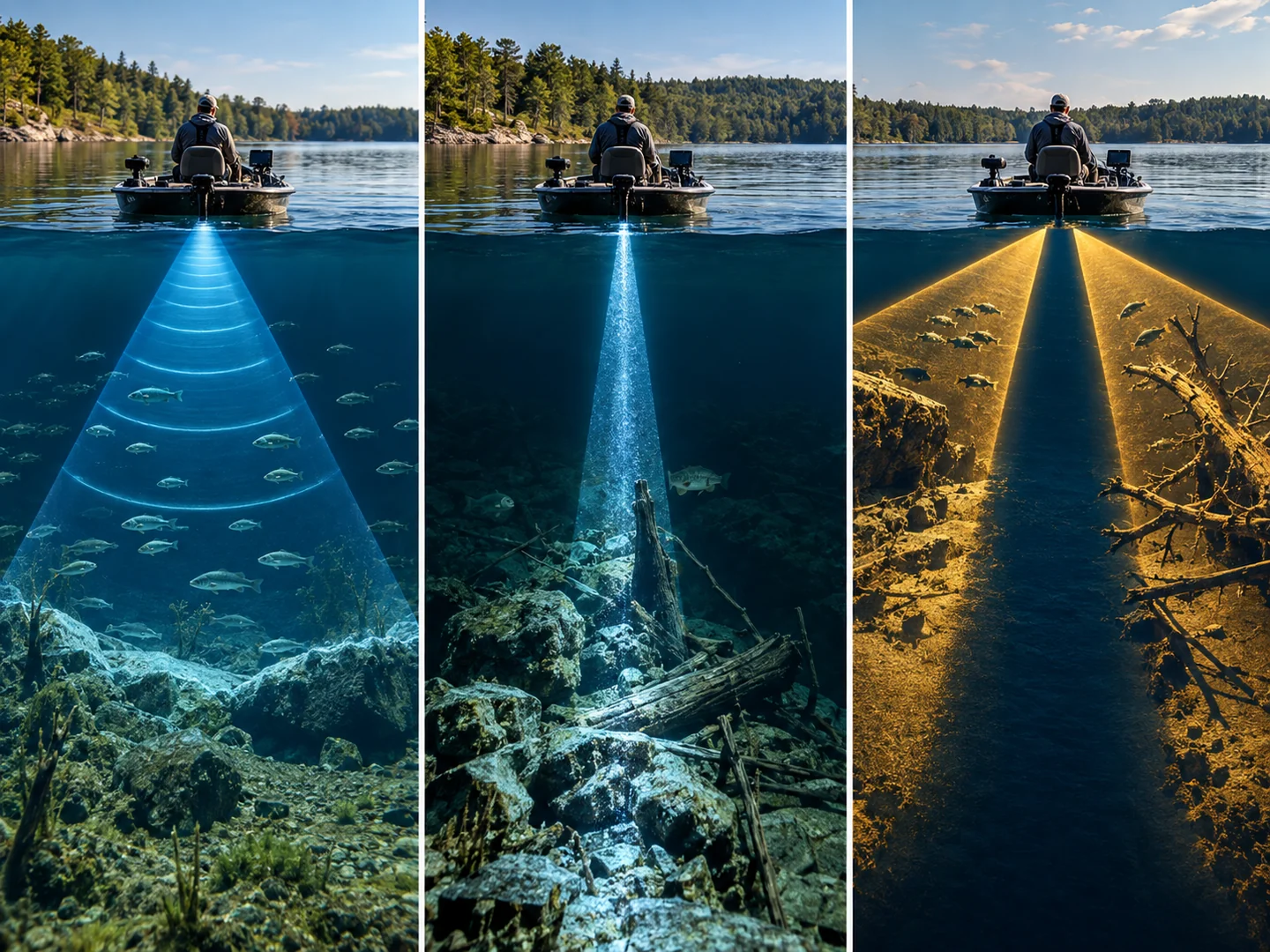
This is the foundation. It looks mainly below the boat and is useful for depth, bottom shape and fish targets. CHIRP systems sweep a range of frequencies rather than relying on one fixed pulse, which can improve target separation and clarity when the transducer and settings are appropriate.
Down imaging
Down imaging is still focused below the boat, but it is designed to show structure with more picture-like detail. It is helpful when you care about distinguishing branches, rocks, vegetation and fish-holding cover directly under your path.
Side imaging
Side imaging searches outward to both sides of the boat. That can be a major efficiency upgrade for anglers who spend time locating weed edges, rock, brush, docks or other structure before casting. It also creates more information to read, so it benefits from a screen large enough to make the left and right returns useful.
Forward-facing or live sonar
Live sonar shows a real-time view ahead of or below the boat, depending on the system and transducer orientation. Treat it as a system purchase rather than a checkbox. You may need a dedicated transducer, black box or module, compatible display, appropriate mount and enough power. Compatibility should be verified against the exact chartplotter or fish finder model before buying.
3. Decide how much GPS and mapping you need
Built-in GPS and detailed preloaded charts are not the same thing. A unit can let you save waypoints and tracks while offering only a basic basemap. Another package may include detailed inland or coastal charts, while a visually similar SKU from the same product family may not.
If you fish large lakes, unfamiliar water, reservoirs with complex structure or coastal areas, mapping can be as important as sonar. Look for the exact chart bundle, supported map cards and whether the unit can create custom contours from your own sonar data.
4. Choose screen size by how you will use the screen
A larger display is most valuable when you run split screens, use side imaging, view detailed maps or sit farther away from the unit. A smaller display can be the better fit when cockpit space is tight or the unit sits close to you on a kayak.
Do not buy by diagonal inches alone. Resolution, brightness, viewing angle, button or touchscreen ergonomics and how much data you put on the screen all affect readability. A compact high-resolution screen used for one sonar view can be easier to read than a larger display divided into four panes.
5. The transducer bundle can matter more than the head unit
The display can only show sonar modes supported by the connected hardware. If you want side imaging, confirm that the exact bundle includes a side-imaging transducer. If you only need CHIRP and down imaging, a simpler transducer can save money and be easier to mount.
Mounting is part of compatibility too. Check transom clearance, kayak track or scupper options, trolling-motor interference, cable routing and whether the transducer can sit in clean water while underway. A feature you cannot mount correctly is not a useful feature.

6. Check power draw, networking and your upgrade path
On a wired boat, the electrical system may make a modest display load easy to handle. On a kayak, portable kit or ice shuttle, current draw directly affects battery size and runtime. Use the manufacturer’s stated supply voltage and current draw for the exact unit when sizing a battery, and leave practical reserve rather than planning around a perfect laboratory runtime.
Networking matters most if you expect to grow the system. Some displays can share sonar, waypoints, radar or other data; others are intentionally simple standalone units. If live sonar, trolling-motor integration or a second station is likely within a year or two, check that path before committing to a product family.
What features should you prioritize?
| Fishing situation | Prioritize | Usually enough | Consider paying more for | Watch out for |
|---|---|---|---|---|
| Kayak, small lakes | Compact display, GPS, low power draw, easy mount | CHIRP plus down imaging | 7-inch screen or side imaging if space allows | Oversized transducer, awkward battery setup |
| Bass boat, structure fishing | Readable split screen, mapping, strong transducer options | CHIRP plus down imaging | Side imaging, networking, live-sonar compatibility | Buying a display too small for side-by-side views |
| General freshwater boat | GPS, clear sonar, useful local charts | 5- to 7-inch display with CHIRP | Down imaging and better map package | Assuming GPS means detailed charts |
| Offshore or big water | Brightness, mapping, transducer compatibility, power | Depends on depth and target species | Larger display, networking, appropriate CHIRP transducer | Choosing by freshwater feature lists alone |
Compact and efficient
GPS, low power draw, easy mount
CHIRP plus down imaging
7-inch screen or side imaging
Transducer and battery fit
Search and split-screen use
Mapping and readable display
CHIRP plus down imaging
Side imaging and networking
Screen too small for multiple panes
Balanced setup
GPS and useful charts
5- to 7-inch CHIRP unit
Down imaging, better maps
GPS without detailed charts
Depth and system fit first
Brightness, maps, transducer fit
Depth-specific system choice
Larger display and networking
Freshwater-only assumptions
Three current examples of feature sets, not a ranking
These are representative current Amazon.com US examples that show how the decisions above translate into real products. They are not a replacement for a full best-fish-finder roundup.
Garmin STRIKER Vivid 4cv with GT20-TM
A compact 4-inch GPS fish finder that pairs traditional CHIRP with ClearVü in the included GT20-TM transducer.
Why it belongs here: it demonstrates the compact end of the market without forcing a bare-bones sonar-only setup. It makes sense when space is tight and you want GPS plus two useful sonar views, but it is not the choice for anglers who specifically want side imaging or a large multi-pane display.
Lowrance Eagle 5 with SplitShot HD
A 5-inch unit built around CHIRP, DownScan Imaging, GPS and inland mapping in the exact SplitShot HD configuration.
Why it belongs here: it shows the middle ground between basic sonar and a side-imaging system. The important lesson is the exact bundle. Lowrance sells Eagle models with different transducers and mapping options, so the product family name alone is not enough to confirm features.
Humminbird HELIX 7 MSI GPS G4
A 7-inch step-up configuration with MEGA Side Imaging, MEGA Down Imaging, Dual Spectrum CHIRP, GPS and built-in mapping.
Why it belongs here: it illustrates why screen area and transducer capability start to matter more when you add side imaging. It is a more feature-rich setup than the compact examples above, but that only pays off if you have the space to mount it and will use the added search view.
Common fish finder buying mistakes
Buying the biggest screen before choosing sonar
A larger screen can be useful, but it does not fix a system that lacks the sonar view you need. Choose capability first, then buy enough display area to use it comfortably.
Assuming every model in a family has the same transducer
One product family can include sonar-only, down-imaging and side-imaging versions. Match the exact model number and included transducer to the retailer listing.
Confusing GPS with detailed maps
GPS can provide position, waypoints and tracks without a premium chart package. Verify what maps are actually included and what optional chart cards the unit supports.
Ignoring installation and power
A large transducer, a bright 9-inch display or an additional sonar module can change mounting and battery requirements. Plan the physical system before ordering electronics.
Paying for an upgrade path you will never use
Networking and forward-facing-sonar compatibility are valuable when you have a real plan to expand. If you want a simple standalone unit for a small boat or kayak, paying for a complex ecosystem may not improve your fishing.
How we researched this fish finder guide
GearAndFish checked current manufacturer specifications and exact Amazon.com US listings for the example units, then compared those facts with the decision patterns showing up in the current U.S. search results. We did not physically test these fish finders for this article. See how we pick gear for the site-wide research approach.
FAQ
What size fish finder screen do I need?
For a compact kayak or small boat, 4 to 7 inches is a practical range when the display sits close to you. Move larger when you regularly use split screens, side imaging or detailed maps, or when the display is mounted farther away.
Is side imaging worth it?
Side imaging is most useful when you spend time searching for structure or fish away from the boat’s path. It can be less valuable for anglers who mostly need depth, basic fish targets and a simple view directly below the boat.
Do I need GPS on a fish finder?
GPS is worth prioritizing if you want to save fishing spots, track routes, navigate back to ramps or pair sonar with mapping. For very small familiar waters, a basic sonar-only unit can still work, but GPS adds useful repeatability.
Is CHIRP better than standard sonar?
CHIRP can provide improved target separation and detail by transmitting across a range of frequencies. The real result still depends on the transducer, installation, water depth, settings and display, so it should be judged as part of the complete system.
Do fish finders work on kayaks?
Yes. The main constraints are mounting space, transducer placement, battery capacity and cable management. Compact units are popular because they are easier to power, remove and position within reach.
Can I add forward-facing sonar later?
Sometimes, but only if the display and ecosystem support the required live-sonar hardware. Check compatibility for the exact model before buying if forward-facing sonar is part of your future plan.